Preamble
Microsoft 365 tells you SharePoint is being used. It doesn’t tell you *by whom, for what, or whether half your sites are just wasting storage*.
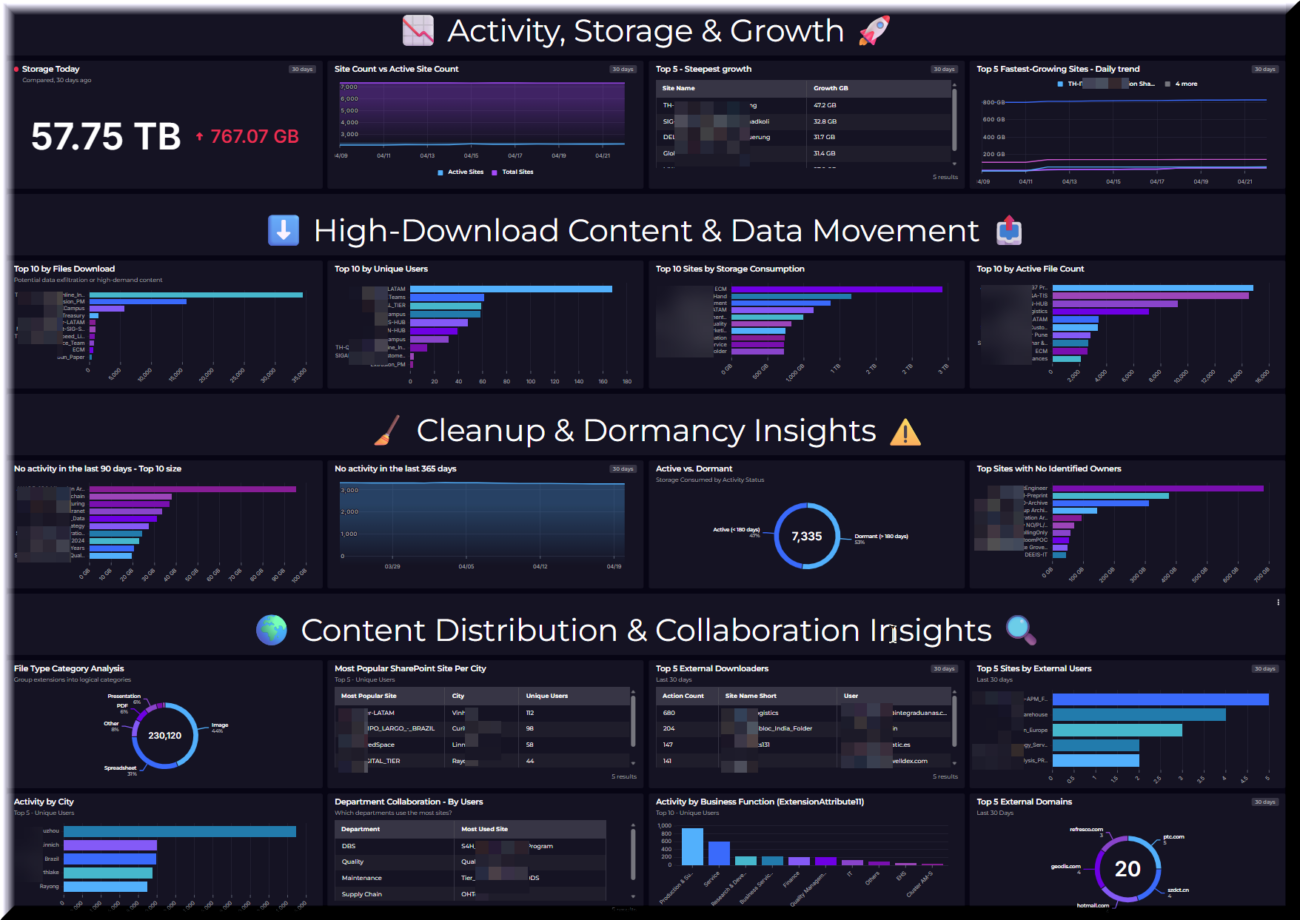
This post walks through a complete SharePoint Online monitoring solution built on Log Analytics: three PowerShell scripts that collect data from EntraID, Microsoft Graph and the Purview audit API, and 20 KQL queries that turn that data into actionable insights — storage trends, dormancy analysis, external access, and usage broken down by city, department, and business function.
No custom connectors. No third-party tools. Just data you already have, made visible.
SquaredUp Cloud is used as dashboard solution. – The free tier comes with 60+ plugins and offers secure sharing with unlimited colleagues – The code is not tight to the visualization software though. 😉
This entire solution is open source. Costs occur only for the data ingested to the Log Analytics workspace.
Introduction
This dashboard provides a structured analysis of SharePoint Online using KQL-based metrics derived from site metadata, user activity events, and EntraID user attributes collected into Log Analytics via three PowerShell scripts.
It focuses on identifying storage growth patterns, site engagement levels, and governance gaps, while also highlighting external access exposure and organizational usage distribution.
The queries analyze daily and 14-day storage trends, growth velocity per site, and current versus historical consumption, enabling comparison between the largest and fastest-growing sites. Activity metrics from the Purview audit stream are used to identify highly engaged sites and to distinguish active collaboration from dormant or abandoned content.
In addition, the dashboard summarizes the governance posture across the SharePoint estate, including site ownership accountability, active versus dormant classification, and inactivity thresholds at 90 and 365 days. Usage breakdowns by city, department, and business function — enriched via EntraID attributes — connect SharePoint behavior to organizational structure, and external access analysis covers both individual users and domains.
Table of Content
- Introduction
- Solution Brief
- Prerequisites
- System Assigned Managed Identity
- Enterprise Application – “PowerShellReadAccess”
- Configuration
- Script Adjustments
- KQL Queries
- Activity, Storage & Growth
- High‑Download Content & Data Movement
- Content Distribution & Collaboration Insights
- Conclusion
Solution Brief
Before the queries can run, data needs to land in Log Analytics. Three PowerShell scripts handle that — and it’s worth understanding what each one feeds, because the KQL queries target their output tables directly. – All scripts can be downloaded: https://github.com/Juanito99/SharePointOnlineMonitoring/
Publish-SharePointSiteInfoToLaw.ps1 runs on a schedule and calls the Microsoft Graph reports API to collect per-site metadata: storage used and allocated, file counts, last activity date, and page views. It enriches the data with human-readable site names (the reports API only returns GUIDs) and writes everything to the sharepointsiteinformation_CL table. This is the source for all storage, dormancy, and site health queries.
Publish-SharePointUsageInformationToLAW_ps7.ps1 runs hourly and pulls raw user activity events from the Microsoft Purview Management Activity API — file accesses, downloads, uploads, and page views. It filters out OneDrive and personal site traffic, de-duplicates overlapping poll windows, and writes event-level records to the sharepointusageinfo_CL table. This is the source for all activity, external access, and usage pattern queries.
Publish-EntraIDUsersToLAW.ps1 runs on a schedule and retrieves all on-premises-synchronised member accounts from EntraID via the Microsoft Graph `Get-MgUser` API. It collects identity and directory attributes — display name, UPN, department, city, company, on-premises extension attributes, and last interactive sign-in date — and writes them to the entraidusers_CL table. This is the enrichment source that connects SharePoint activity back to organizational structure in the usage breakdown queries.
AzLogDcrIngestPS, a module by Morten Knudsen takes care for all tasks related to log ingestion.
Prerequisites
System Assigned Managed Identity
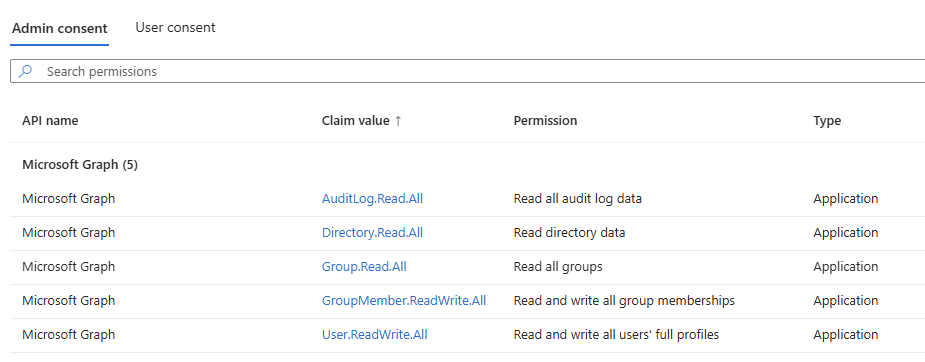
System assigned Managed Identity is required on the Automation Account which runs the PowerShell script. Graph permissions for reading, directory information, properties and the audit log are required.
Grant the Managed Identity read permissions via the READER role assigned on Management Group level.
See the screenshot below. – Write permissions are not required in this solution and can be omitted.
Enterprise Application – “PowershellReadAccess”
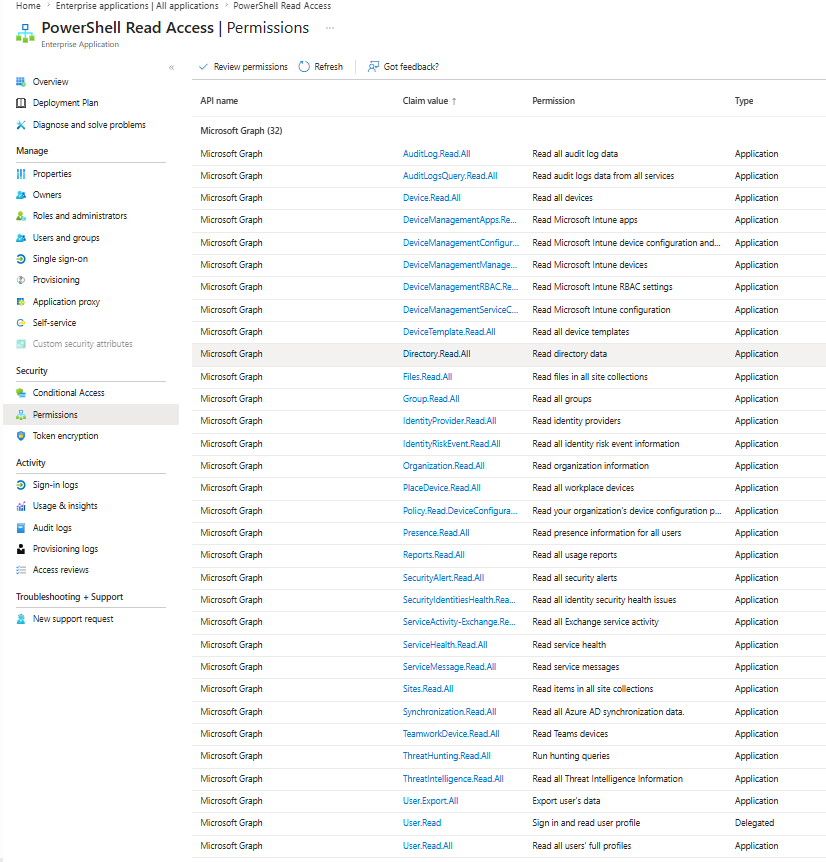
A custom service principal “PowerShellReadAccess” is used to obtain information from Entra, GraphAPI and the unified log. As this is also used for other automation requirements, please reduce the assigned permission to your requirement.
Configuration
Required script adjustments
The following sections Powershell code must be adopted to fit YOUR environment.
Please note!
Before running the script the LogIngestApp must be created upfront. Also the DCE is to be created before using it.
Check mortenknudsen.net for details on how to setup the AzLogDcrIngest framework.
Common adjustments:
Note! The $tablename needs to be kept.
#region Configuration

[bool]$EnableVerbose                                              = $true
[string]$VerbosePreference                                        = "SilentlyContinue"  # "Continue"

[string]$TenantId                                                 = "<your-azure-ad-tenant-id>"

# Azure Key Vault - Log Ingestion Application
[string]$AzureKeyVaultName                                        = "<your-key-vault-name>"
[string]$AzureKeyVaultSecretName                                  = "<your-log-ingestion-app-secret-name>"

[object]$AzureKeyVaultSecret                                      = Get-AzKeyVaultSecret -VaultName $AzureKeyVaultName -Name $AzureKeyVaultSecretName
[System.Security.SecureString]$AzureKeyVaultSecretValue           = $AzureKeyVaultSecret.SecretValue
[string]$LogIngestAppSecret                                       = $AzureKeyVaultSecretValue | ConvertFrom-SecureString -AsPlainText

[string]$ClientSecret                                             = Get-AzKeyVaultSecret -VaultName $AzureKeyVaultName -Name '<your-graph-app-client-secret-name>' |
                                                                        Select-Object -ExpandProperty SecretValue |
                                                                        ConvertFrom-SecureString -AsPlainText

[string]$ClientId                                                 = Get-AzKeyVaultSecret -VaultName $AzureKeyVaultName -Name '<your-graph-app-client-id-secret-name>' |
                                                                        Select-Object -ExpandProperty SecretValue |
                                                                        ConvertFrom-SecureString -AsPlainText

[string]$LogIngestAppId                                           = "<your-log-ingestion-app-client-id>"
[string]$AzDcrLogIngestServicePrincipalObjectId                    = "<your-log-ingestion-app-service-principal-object-id>"

[string]$LogAnalyticsWorkspaceResourceId                          = "/subscriptions/<your-subscription-id>/resourceGroups/<your-resource-group>/providers/Microsoft.OperationalInsights/workspaces/<your-law-name>"

[string]$AzDcrResourceGroup                                       = "<your-dcr-resource-group>"
[bool]$AzDcrSetLogIngestApiAppPermissionsDcrLevel                  = $false
[array]$AzLogDcrTableCreateFromReferenceMachine                   = @()
[bool]$AzLogDcrTableCreateFromAnyMachine                          = $true

[string]$AzDceName                                                = "<your-data-collection-endpoint-name>"
[string]$TableName                                                = "sharepointsiteinformation"
[string]$AzDcrName                                                = "dcr-prd-" + $TableName + "_CL"

#endregion Configuration
KQL Queries
📉 Activity, Storage & Growth 🚀
Storage Today
let DailyStorage = sharepointsiteinformation_CL
| where isDeleted == false
| where TimeGenerated >= ago(31d)
| extend ReportDay = startofday(TimeGenerated)
| summarize arg_max(TimeGenerated, *) by siteId, ReportDay
| summarize StorageUsedGB = round(sum(tolong(storageUsedInBytes)) / (1024.0 * 1024 * 1024), 2) by ReportDay;
DailyStorage
| summarize
    StorageUsedGB_Today     = maxif(StorageUsedGB, ReportDay >= startofday(ago(1d))),
    StorageUsedGB_30DaysAgo = maxif(StorageUsedGB, ReportDay between (startofday(ago(31d)) .. startofday(ago(29d))))
| extend StorageGrowthGB = round(StorageUsedGB_Today - StorageUsedGB_30DaysAgo, 2)
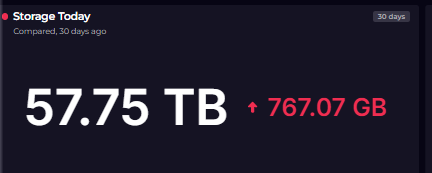
Purpose: Reports total SharePoint storage consumed today versus 30 days ago, with net growth.
Why Useful: Provides a snapshot of current storage health and monthly consumption trend.
Benefit: Supports capacity planning and budget forecasting for storage licensing.
Site Count vs Active Site Count
sharepointsiteinformation_CL
| where isDeleted == false
| where TimeGenerated >= ago(14d)
| extend ReportDay = startofday(TimeGenerated)
| summarize arg_max(TimeGenerated, *) by siteId, ReportDay
| summarize
    TotalSites  = dcount(siteId),
    ActiveSites = dcountif(siteId, tolong(pageViewCount) > 0 or tolong(activeFileCount) > 0)
    by ReportDay
| order by ReportDay asc
Purpose: Compares total site count against actively used sites over the last 14 days.
Why Useful: Reveals how many sites are idle versus genuinely in use, supporting governance decisions.
Benefit: Helps justify cleanup efforts by quantifying the proportion of inactive sites.
Top 5 – Steepest Growth
let SiteDaily = sharepointsiteinformation_CL
    | where isDeleted == false
    | where TimeGenerated >= ago(14d)
    | extend ReportDay     = startofday(TimeGenerated)
    | extend StorageUsedGB = round(tolong(storageUsedInBytes) / (1024.0 * 1024 * 1024), 4)
    | summarize arg_max(TimeGenerated, StorageUsedGB) by siteId, siteName, ReportDay;
let EarliestDay = SiteDaily
    | summarize FirstDay = min(ReportDay) by siteId
    | join kind=inner (SiteDaily) on siteId, $left.FirstDay == $right.ReportDay
    | project siteId, FirstDay, FirstGB = StorageUsedGB;
let LatestDay = SiteDaily
    | summarize LastDay = max(ReportDay) by siteId
    | join kind=inner (SiteDaily) on siteId, $left.LastDay == $right.ReportDay
    | project siteId, siteName, LastDay, LastGB = StorageUsedGB;
LatestDay
| join kind=inner (EarliestDay) on siteId
| extend GrowthGB = round(LastGB - FirstGB, 2)
| where GrowthGB > 0
| top 5 by GrowthGB desc
| project siteName, FirstDay, FirstGB, LastDay, LastGB, GrowthGB
| order by GrowthGB desc
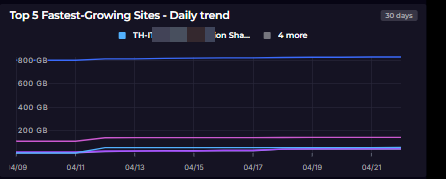
Purpose: Ranks the five sites with the highest absolute storage growth over the last 14 days.
Why Useful: Pinpoints specific sites that need storage review or capacity planning attention.
Benefit: Focuses admin effort on the highest-impact sites rather than scanning all sites.
Top 5 Fastest-Growing Sites – Daily trend
let SiteDaily = sharepointsiteinformation_CL
    | where isDeleted == false
    | where TimeGenerated >= ago(14d)
    | extend ReportDay     = startofday(TimeGenerated)
    | extend StorageUsedGB = round(tolong(storageUsedInBytes) / (1024.0 * 1024 * 1024), 4)
    | summarize arg_max(TimeGenerated, StorageUsedGB) by siteId, siteName, ReportDay;
let EarliestDay = SiteDaily
    | summarize FirstDay = min(ReportDay) by siteId
    | join kind=inner (SiteDaily) on siteId, $left.FirstDay == $right.ReportDay
    | project siteId, FirstDay, FirstGB = StorageUsedGB;
let LatestDay = SiteDaily
    | summarize LastDay = max(ReportDay) by siteId
    | join kind=inner (SiteDaily) on siteId, $left.LastDay == $right.ReportDay
    | project siteId, siteName, LastDay, LastGB = StorageUsedGB;
LatestDay
| join kind=inner (EarliestDay) on siteId
| extend GrowthGB = round(LastGB - FirstGB, 2)
| where GrowthGB > 0
| top 5 by GrowthGB desc
| project siteName, FirstDay, FirstGB, LastDay, LastGB, GrowthGB
| order by GrowthGB desc
⬇️ High‑Download Content & Data Movement 📤
Top 10 by Files Download
sharepointusageinfo_CL
| where Operation == "FileDownloaded"
| summarize
    DownloadCount = count(),
    UniqueUsers   = dcount(UserId),
    FileTypes     = make_set(tolower(FileExtension), 10)
    by SiteNameShort
| top 10 by DownloadCount desc
Purpose: Identifies the ten sites with the highest total file download counts.
Why Useful: Surfaces potential data exfiltration risks and high-demand content hubs.
Benefit: Provides a starting point for DLP reviews and security investigations.
Top 10 by Unique Users
sharepointusageinfo_CL
| summarize
    TotalEvents   = count(),
    Downloads     = countif(Operation == "FileDownloaded"),
    Accesses      = countif(Operation == "FileAccessed"),
    Uploads       = countif(Operation == "FileUploaded"),
    UniqueUsers   = dcount(UserId)
    by SiteNameShort
| where SiteNameShort != 'EfficientElements-Sync'
| top 10 by TotalEvents desc
Purpose: Ranks the ten most visited sites by the number of distinct users active on them.
Why Useful: Distinguishes genuinely popular sites from high-event sites driven by automation.
Benefit: Supports prioritization of governance, support, and communication efforts.
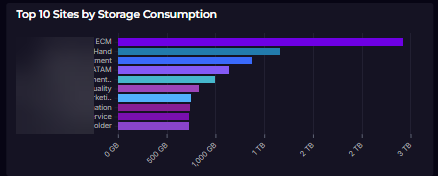
Top 10 Sites by Storage Consumption
sharepointsiteinformation_CL
| where isDeleted == false
| summarize arg_max(TimeGenerated, *) by siteId
| extend StorageUsedGB     = round(tolong(storageUsedInBytes) / (1024.0 * 1024 * 1024), 2)
| extend StorageAllocatedGB = round(tolong(storageAllocatedInBytes) / (1024.0 * 1024 * 1024), 2)
| extend UtilizationPercent = round(toreal(storageUsedInBytes) / toreal(storageAllocatedInBytes) * 100, 2)
| top 10 by StorageUsedGB desc
| project siteName, StorageUsedGB, StorageAllocatedGB, UtilizationPercent, fileCount, activeFileCount, pageViewCount
| order by StorageUsedGB desc
Purpose: Shows the top ten sites ranked by actual storage used, with allocation and utilization percentage.
Why Useful: Quickly surfaces which sites are consuming the most tenant storage quota.
Benefit: Directs cleanup or archiving efforts toward the highest-cost sites first.
Top 10 by Active File Count
sharepointsiteinformation_CL
| where isDeleted == false
| summarize arg_max(TimeGenerated, *) by siteId
| where tolong(activeFileCount) > 0
| extend ActiveFileRatio = round(toreal(activeFileCount) / toreal(fileCount) * 100, 2)
| top 10 by tolong(activeFileCount) desc
| project siteName, activeFileCount, fileCount, ActiveFileRatio, pageViewCount
Purpose: Lists the ten sites with the highest number of actively accessed or modified files.
Why Useful: Identifies the most heavily used content repositories across the tenant.
Benefit: Informs decisions around backup priority, replication, and content management.
🧹 Cleanup & Dormancy Insights ⚠️
No activity in the last 90 days – Top 10 size
sharepointsiteinformation_CL
| where isDeleted == false
| summarize arg_max(TimeGenerated, *) by siteId
| extend LastActivity = todatetime(lastActivityDate)
| where LastActivity < ago(90d)
| extend DaysSinceLastActivity = datetime_diff('day', now(), LastActivity)
| extend StorageUsedGB = round(tolong(storageUsedInBytes) / (1024.0 * 1024 * 1024), 2)
| project siteName, LastActivity, DaysSinceLastActivity, StorageUsedGB
| order by DaysSinceLastActivity, StorageUsedGB desc
| top 10 by StorageUsedGB
Purpose: Lists the ten largest sites that have had no user activity in the past 90 days.
Why Useful: Uncovers storage being consumed by sites that no one is actively using.
Benefit: Directly targets the highest-value cleanup candidates to reclaim storage quota.
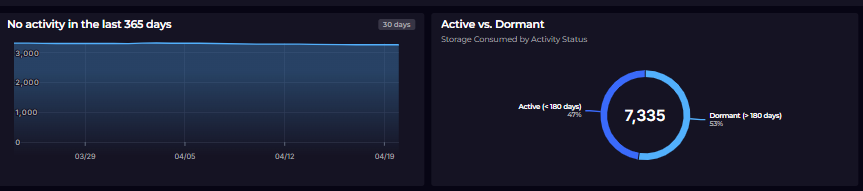
No activity in the last 365 days
sharepointsiteinformation_CL
| where isDeleted == false
| where isnotempty(reportRefreshDate)
| extend SnapshotDay = startofday(todatetime(reportRefreshDate))
| where SnapshotDay between (startofday(ago(30d)) .. startofday(now()))
| summarize arg_max(TimeGenerated, *) by SnapshotDay, siteId
| extend LastActivity = todatetime(lastActivityDate)
| where LastActivity < ago(365d)
| summarize StaleSiteCount = count() by SnapshotDay
| union (
    range SnapshotDay from startofday(ago(13d)) to startofday(now()) step 1d
    | extend StaleSiteCount = 0
)
| summarize StaleSiteCount = max(StaleSiteCount) by SnapshotDay
| where StaleSiteCount > 10
| order by SnapshotDay asc
Purpose: Tracks the daily count of sites with no activity in the last 365 days over a 30-day window.
Why Useful: Shows whether the number of truly stale sites is growing or shrinking over time.
Benefit: Measures the impact of governance campaigns on reducing dormant site sprawl.
Active vs. Dormant
sharepointsiteinformation_CL
| where isDeleted == false
| summarize arg_max(TimeGenerated, *) by siteId
| extend LastActivity    = todatetime(lastActivityDate)
| extend ActivityStatus  = iff(LastActivity >= ago(180d), "Active (< 180 days)", "Dormant (> 180 days)")
| extend StorageUsedGB   = tolong(storageUsedInBytes) / (1024.0 * 1024 * 1024)
| summarize
    SiteCount       = count(),
    TotalStorageGB  = round(sum(StorageUsedGB), 2),
    AvgStorageGB    = round(avg(StorageUsedGB), 2)
    by ActivityStatus
Purpose: Segments all sites into active (used within 180 days) and dormant buckets with storage totals.
Why Useful: Quantifies how much storage is tied up in sites no longer in regular use.
Benefit: Provides an executive-level summary to justify investment in site lifecycle management.
Top Sites with No Identified Owners
let SiteUsers = sharepointusageinfo_CL
    | where UserId != "app@sharepoint"
    | summarize
        UniqueUsers = dcount(UserId),
        LastEvent   = max(todatetime(CreationTime))
        by SiteNameShort;
sharepointsiteinformation_CL
| where isDeleted == false
| summarize arg_max(TimeGenerated, *) by siteId
| extend StorageUsedGB = round(tolong(storageUsedInBytes) / (1024.0 * 1024 * 1024), 2)
| join kind=leftouter (SiteUsers) on $left.siteNameFromUrl == $right.SiteNameShort
| where isempty(UniqueUsers) or UniqueUsers == 0
| where StorageUsedGB > 0.1
| project siteName, StorageUsedGB, fileCount, lastActivityDate
| order by StorageUsedGB desc
| top 10 by StorageUsedGB
Purpose: Finds sites with stored files but no traceable user activity, indicating missing ownership.
Why Useful: Surfaces unaccountable content that poses a governance and compliance risk.
Benefit: Enables targeted outreach to assign owners before sites become orphaned.
🌍 Content Distribution & Collaboration Insights 🔍
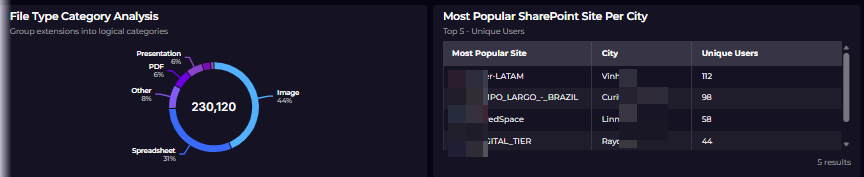
File Type Category Analysis
sharepointusageinfo_CL
| where isnotempty(FileExtension)
| extend FileCategory = case(
    tolower(FileExtension) in ("xlsx", "xlsm", "xls", "csv"),           "Spreadsheet",
    tolower(FileExtension) in ("pptx", "ppt"),                          "Presentation",
    tolower(FileExtension) in ("docx", "doc", "txt"),                   "Document",
    tolower(FileExtension) in ("pdf"),                                   "PDF",
    tolower(FileExtension) in ("jpg", "jpeg", "png", "bmp", "jfif"),    "Image",
    tolower(FileExtension) in ("xml", "json"),                           "Data/Config",
    tolower(FileExtension) in ("zip", "7z", "rar"),                      "Archive",
                                                                         "Other")
| summarize EventCount = count() by FileCategory
| order by EventCount desc
Purpose: Groups all SharePoint file activity by content type (spreadsheets, PDFs, images, archives, etc.).
Why Useful: Reveals the dominant file formats in use, informing storage and compliance policies.
Benefit: Helps target data classification and retention policies to the most prevalent content types.
Most Popular SharePoint Site Per City
let EntraIdUserLookup = entraidusers_CL
| summarize arg_max(TimeGenerated, *) by Mail
| where isnotempty(Mail) and isnotempty(City)
| project MailLower = tolower(Mail), AccessingUserCity = City;
sharepointusageinfo_CL
| where UserId != "app@sharepoint"
| where SiteNameShort != "EfficientElements-Sync"
| where isnotempty(UserId) and isnotempty(SiteNameShort)
| extend UserPrincipalNameLower = tolower(UserId)
| join kind=inner (EntraIdUserLookup) on $left.UserPrincipalNameLower == $right.MailLower
| extend CityNormalized = trim(@" ", tolower(tostring(AccessingUserCity)))
| extend CityNormalized = replace_regex(CityNormalized, @"[^a-z0-9 ]", " ")
| extend CityNormalized = replace_regex(CityNormalized, @"\s+", " ")
| extend CityNormalized = replace_regex(CityNormalized, @"\b(city|region|district|metro|metropolitan|area|office)\b", "")
| extend CityNormalized = trim(@" ", replace_regex(CityNormalized, @"\s+", " "))
| where isnotempty(CityNormalized)
| extend CityCanonical = case(
    CityNormalized == "china", "Shanghai",
    CityNormalized has "cn", "Shanghai",
    CityNormalized
)
| extend CityFuzzyKey = substring(replace_string(CityCanonical, " ", ""), 0, 8)
| summarize
    SiteEvents  = count(),
    UniqueUsers = dcount(UserId)
    by CityFuzzyKey, CityCanonical, SiteNameShort
| summarize arg_max(SiteEvents, SiteNameShort, UniqueUsers, CityCanonical) by CityFuzzyKey
| extend CityWords = split(tolower(CityCanonical), " ")
| mv-apply CityWord = CityWords to typeof(string) on (
    summarize CityWordList = make_list(
        iff(
            isempty(CityWord),
            "",
            strcat(toupper(substring(CityWord, 0, 1)), substring(CityWord, 1))
        )
    )
)
| project City = strcat_array(CityWordList, " "), MostPopularSite = SiteNameShort, UniqueUsers
| top 5 by UniqueUsers desc
Purpose: Identifies the single most accessed SharePoint site for each city where users are located.
Why Useful: Reveals geographic usage patterns and which sites matter most to each office location.
Benefit: Supports regional IT planning and helps prioritize site performance improvements by location.
Top 5 External Downloaders
sharepointusageinfo_CL
| where TimeGenerated between (ago(30d) .. now())
| where UserId != "app@sharepoint"
| where isnotempty(UserId) and UserId !endswith "@nwtraders.msft" and UserId !endswith "@nwtraders.onmicrosoft.com"
| extend UserDomain = extract("@(.+)$", 1, UserId)
| where Operation == "FileDownloaded"
| extend User=replace_string(UserId,"urn:spo:guest#","")
| summarize ActionCount = count() by User, SiteNameShort
| top 5 by ActionCount desc
Purpose: Lists the five external users who downloaded the most files in the last 30 days.
Why Useful: Flags high-volume external download activity that may warrant a security review.
Benefit: Supports DLP investigations and guest access audits with concrete user-level evidence.
Top 5 Sites by External Users
let TopExternalDomains30d = sharepointusageinfo_CL
| where TimeGenerated between (ago(30d) .. now())
| where UserId != "app@sharepoint"
| where isnotempty(UserId) and UserId !endswith "@nwtraders.msft" and UserId !endswith "@nwtraders.onmicrosoft.com"
| extend UserDomain = extract("@(.+)$", 1, UserId)
| where isnotempty(UserDomain)
| summarize UniqueUserCount = dcount(UserId) by UserDomain
| top 5 by UniqueUserCount desc;
sharepointusageinfo_CL
| where TimeGenerated between (ago(30d) .. now())
| where UserId != "app@sharepoint"
| where isnotempty(UserId) and UserId !endswith "@nwtraders.msft" and UserId !endswith "@nwtraders.onmicrosoft.com"
| extend UserDomain = extract("@(.+)$", 1, UserId)
| where UserDomain in (TopExternalDomains30d | project UserDomain)
| summarize UniqueUserCount = dcount(UserId) by UserDomain, SiteNameShort
| order by UserDomain asc, UniqueUserCount desc
| top 5 by UniqueUserCount desc;
Purpose: Shows the five sites accessed most by users from external domains in the last 30 days.
Why Useful: Identifies which collaboration sites have the highest external exposure.
Benefit: Helps scope external sharing reviews and enforce least-privilege access policies.
Activity by City
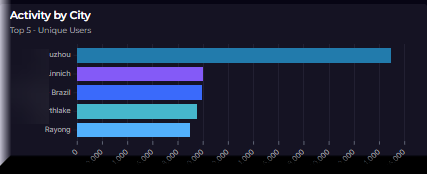
let UserLookup = entraidusers_CL
    | summarize arg_max(TimeGenerated, *) by Mail
    | where isnotempty(Mail) and isnotempty(City)
    | project Mail = tolower(Mail), City, CompanyName;
sharepointusageinfo_CL
| where UserId != "app@sharepoint"
| extend MailLower = tolower(UserId)
| join kind=inner (UserLookup) on $left.MailLower == $right.Mail
| summarize
    EventCount  = count(),
    UniqueUsers = dcount(UserId),
    UniqueSites = dcount(SiteNameShort)
    by City
| order by EventCount desc
| top 5 by EventCount
Purrpose: Aggregates SharePoint events, unique users, and unique sites accessed grouped by user city.
Why Useful: Provides a geographic breakdown of SharePoint engagement across office locations.
Benefit: Informs regional adoption strategies and helps identify underserved locations.
Department Collaboration – By Users
let UserLookup = entraidusers_CL
    | summarize arg_max(TimeGenerated, *) by Mail
    | where isnotempty(Mail) and isnotempty(Department)
    | project Mail = tolower(Mail), Department;
sharepointusageinfo_CL
| where UserId != "app@sharepoint"
| where SiteNameShort != 'EfficientElements-Sync'
| extend MailLower = tolower(UserId)
| join kind=inner (UserLookup) on $left.MailLower == $right.Mail
| summarize
    EventCount     = count(),
    UniqueSites    = dcount(SiteNameShort),
    UniqueUsers    = dcount(UserId),
    MostUsedSite   = any(SiteNameShort)
    by Department
| where UniqueUsers > 1
| top 5 by UniqueUsers desc
Purpose: Ranks departments by unique users and the number of distinct SharePoint sites they access.
Why Useful: Highlights cross-functional collaboration patterns and departments with broad site reach.
Benefit: Identifies key stakeholder groups for governance and training initiatives.
Activity by Business Function (ExtensionAttribute11)
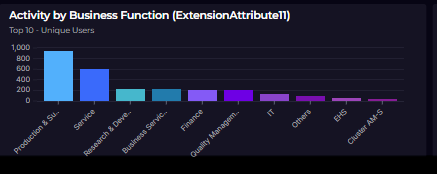
let UserLookup = entraidusers_CL
    | summarize arg_max(TimeGenerated, *) by Mail
    | where isnotempty(Mail) and isnotempty(OnPremisesExtensionAttribute11)
    | project Mail = tolower(Mail), BusinessFunction = OnPremisesExtensionAttribute11;
sharepointusageinfo_CL
| where UserId != "app@sharepoint"
| extend MailLower = tolower(UserId)
| join kind=inner (UserLookup) on $left.MailLower == $right.Mail
| summarize
    EventCount  = count(),
    UniqueUsers = dcount(UserId),
    UniqueSites = dcount(SiteNameShort),
    Downloads   = countif(Operation == "FileDownloaded"),
    Uploads     = countif(Operation == "FileUploaded")
    by BusinessFunction
| order by EventCount desc
| top 10 by EventCount
Purpose: Breaks down SharePoint usage (events, users, uploads, downloads) by business function.
Why Useful: Reveals which business areas drive the most SharePoint activity and content movement.
Benefit: Enables targeted adoption programs and governance focus by functional area.
Top 5 External Domains
sharepointusageinfo_CL
    | where TimeGenerated between (ago(30d) .. now())
    | where UserId != "app@sharepoint"
    | where isnotempty(UserId) and UserId !endswith "@sig.biz" and UserId !endswith "@sigitglobal.onmicrosoft.com"
    | extend UserDomain = extract("@(.+)$", 1, UserId)
    | where isnotempty(UserDomain)
    | summarize UniqueUserCount = dcount(UserId) by UserDomain
    | top 5 by UniqueUserCount desc
Purpose: Lists the top five external email domains by unique user count accessing SharePoint in the last 30 days.
Why Useful: Shows which partner or customer organizations have the most active presence in the tenant.
Benefit: Supports external sharing governance by identifying domains that may need policy review.
Conclusion
SharePoint Online sites are easy to provision and hard to govern. Sites accumulate, storage grows, and without visibility into what’s actually being used, decisions default to either doing nothing or broad-stroke policies that frustrate users.
The approach in this post doesn’t require a new platform or third-party tooling — just three PowerShell scripts feeding three Log Analytics tables, and a set of KQL queries that turn raw telemetry into decisions. You can see which sites are consuming quota without justification, who is accessing files from outside your tenant, and how SharePoint usage maps to departments and locations across your organisation.
The 20 queries covered here are a starting point, not a ceiling. Once your data is flowing into Log Analytics, the same tables support ad-hoc investigations, trend analysis over longer windows, and alerting on thresholds that matter to your business — dormancy periods, external domain spikes, or storage growth rates.
More importantly, the data is yours. It came from APIs you already have access to, lands in infrastructure you control, and can be queried and visualised however your team works best — whether that’s directly in Log Analytics, embedded in a SquaredUp dashboard, or exported for reporting.
If your SharePoint estate has grown faster than your visibility into it, this is the point to close that gap
