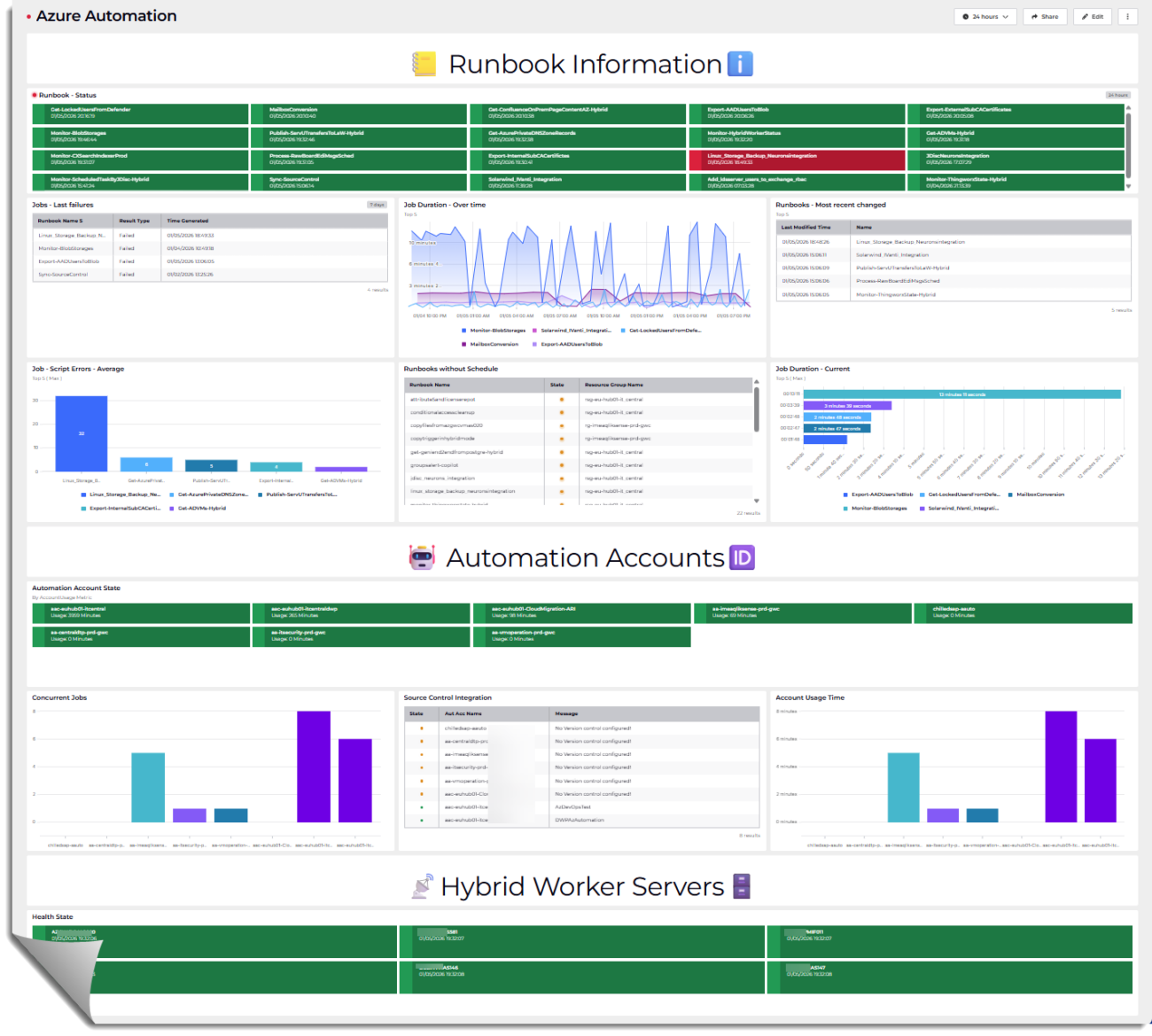
Observability turns scattered telemetry into actionable signals. This post doesn’t walk through building the dashboard UI — it digs into the queries and scripts that feed it. You’ll see the exact Kusto queries, PowerShell runbooks, and automation scripts used to collect, shape, and surface the data that drives each dashboard tile, alert, and governance check.
What this post covers:
- Runbook Health — Kusto queries and a runbook script that aggregate recent runbook results, surface failures, and compute failure rates and trends.
- Performance Insights — Queries that identify long‑running jobs, runtime percentiles, and outliers; scripts that annotate jobs with metadata for deeper analysis.
- Error Visibility — Parsers and grouping logic to extract exception types, stack traces, and recurring error patterns for prioritization.
- Governance Signals — Scripts to detect recent runbook changes, missing schedules, and source control adoption; queries that correlate change events with runbook outcomes.
- Capacity Monitoring — Queries and alerting via script that track Automation Account quotas, usage trends, and thresholds to prevent throttling.
- Hybrid Worker Health — Heartbeat collection, availability checks, and aggregation queries that provide a unified view of worker status across cloud and hybrid environments.
This is a code‑first walk through: each section includes the real queries and scripts, explanations of why they work, and tips for adapting them to your environment. You’ll be able to copy, run, and modify the snippets to reproduce the same observability signals in your Automation estate.
Table of Contents
Solution Brief
Most of the data is retrieved from telemetry and metrics that must be sent from the Azure Automation Accounts to Log Analytics. The remaining information is collected by the PowerShell script Monitor-HybridWorkerStatus.ps1 (GitHub Repository), which needs to run hourly within an Automation Account. The script stores the collected data as CSV files in a Storage Account.
CSV Files – Example output
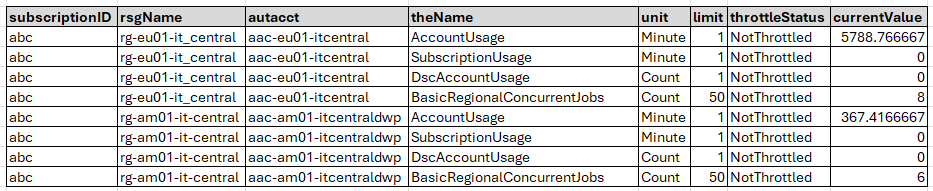
The CSV files created by the script shall look similar like the examples below.
azureautomationaccountstate.csv
azurehybridworkerstate.csv

azurehybridworkerunlinkedRunbooks.csv

azurehybridworkerGITstate.csv

Dashboard Software
SquaredUp Cloud is a SaaS-based operational intelligence platform that delivers unified visibility across on‑premises and cloud environments. It connects to various data sources and infrastructure monitoring systems, and provides flexible drag‑and‑drop dashboards, real‑time monitoring, RollUp status summaries, and built‑in sharing and analytics.
For this project, I used the Azure Log Analytics data source along with CSV File data sources for files stored in an Azure Storage account.
More information: https://docs.squaredup.com/first-steps/getting-started
Prerequisites
Diagnostic settings
The dashboard relies on queries that get data from a Log Analytics Workspace. The following link explains how to configure it for Azure Automation Accounts: Forward Azure Automation job data to Azure Monitor logs | Microsoft Learn
–> Please select All Logs and All Metrics.
System Assigned Managed Identity
System assigned Managed Identity is required on the Automation Account which runs the PowerShell script. Read how on: Using a system-assigned managed identity for an Azure Automation account | Microsoft Learn
Permissions
Azure Automation Account
Grant the Managed Identity read permissions via the READER role assigned on Management Group level to find all Automation Account, runbooks and other relevant settings.
Also permissions on write files in the storage account that should store the CSV files. The roles Storage Account Contributor and Storage Blob Data Contributor shall be assigned.
Storage Account Container
To make the CSV files accessible, you must either share them individually using Storage Access Signatures (SAS tokens or configure a SAS token at the container level that hosts the CSV files. Read-only access is sufficient.
Optionally, you can configure IP restrictions to limit access to only your dashboarding solution or other trusted sources. Read more on: Manage blob containers using the Azure portal – Azure Storage | Microsoft Learn
PowerShell Script
Within the PowerShell Script, adjust values for azureSubscriptionID, resourceGroupName, storageAccountNamen and blobContainer.
$azureSubScriptionID               = "abc..."
$resource                          = "https://management.azure.com/"
$resourceGroupName                 = "resourcegroupNameForStorageAccount"
$storageAccountName                = "theNameOfTheStorageAccount"
$blobContainer                     = "containerNameOfYourChoice"
Configuration
📒Runbook Informationℹ️
Runbook – Status
let azRG = arg("").resources
| where type == "microsoft.automation/automationaccounts"
| extend Resource = toupper(name)
| project Resource;
let azDiag = AzureDiagnostics
| where ResourceType == "AUTOMATIONACCOUNTS"
| where TimeGenerated between (ago(8d) .. now())
| where ResultType !in ('Started', 'In Progress', 'Created')
| where Category != 'AuditEvent'
| project JobId_g, ResultDescription, ResultType, TimeGenerated, Resource, CorrelationId, RunbookName_s
| summarize arg_max(TimeGenerated,*) by  Resource, RunbookName_s
| extend state = case(ResultType == "Completed", "Success",
                      ResultType == "Stopped", "Warning",
                      ResultType == "Suspended", "Error",
                      ResultType == "Failed", "Error",
                       "Unknwon")
| project RunbookName_s, TimeGenerated, ResultType, Resource, state;
azRG | join azDiag on $left.Resource == $right.Resource
| project TimeGenerated, RunbookName_s, state
| sort by TimeGenerated
Purpose: Surface the most recent status of runbooks for each Automation Account over the last 8 days, focusing on terminal outcomes (Success, Warning, Error).
Why Useful: It quickly highlights which runbooks have recently completed, warned, or failed, enabling targeted operational triage without noise from in‑progress or audit events.
Benefit: Accelerates incident response and reliability tracking by providing a concise, up‑to‑date view of runbook health across all Automation Accounts.
Jobs – Last failures
let azRG = arg("").resources
| where type == "microsoft.automation/automationaccounts"
| extend Resource = toupper(name)
| project Resource;
let azDiag = AzureDiagnostics
| where TimeGenerated between (ago(14d) .. now())
| where ResourceType == "AUTOMATIONACCOUNTS"
| where ResultType != 'In Progress'
| where ResultType == "Suspended" or ResultType == "Failed"
| project TimeGenerated, Resource, ResultType, RunbookName_s;
azRG | join azDiag on $left.Resource == $right.Resource
| summarize arg_max(TimeGenerated,*) by RunbookName_s
| project-away Resource1
Purpose: Identify Automation Account runbooks that have recently failed or suspended in the last 14 days and return only the latest occurrence per runbook.
Why Useful: It quickly isolates problematic runbooks without noise from successful or in‑progress jobs, making issue detection more efficient.
Benefit: Enables faster troubleshooting and operational awareness by providing a clean list of the most recent failures across all Automation Accounts.
Job Duration – Over time
let azRG = arg("").resources
| where type == "microsoft.automation/automationaccounts"
| extend Resource = toupper(name)
| project Resource;
let azDiag = materialize(AzureDiagnostics
| where TimeGenerated between (ago(8d) .. now())
| where ResourceType == "AUTOMATIONACCOUNTS"
| where ResultType != 'In Progress'
| where Category != 'AuditEvent'
| where ResultType != 'Created'
| sort by RunbookName_s
| summarize by CorrelationId, ResultType, Resource, TimeGenerated, RunbookName_s
| sort by TimeGenerated asc
| extend RunDurationRaw = TimeGenerated - prev(TimeGenerated)
| extend RunDurationInSec = RunDurationRaw / 1sec
| extend RunDuration = format_timespan(RunDurationRaw, 'hh:mm:ss')
| where ResultType == 'Completed' or ResultType == 'Failed');
let TopRuns = azRG | join azDiag on $left.Resource == $right.Resource
| project TimeGenerated, RunbookName_s, RunDuration, RunDurationInSec
| summarize arg_max(RunDurationInSec,*) by RunbookName_s
| sort by RunDurationInSec
| limit 5
| project RunbookName_s;
azDiag
| where RunbookName_s in (TopRuns)
| project TimeGenerated, RunbookName_s, RunDurationInSec
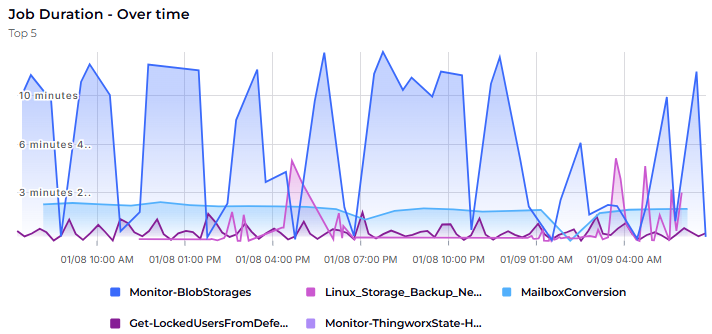
Purpose: Calculate run durations for Completed/Failed Automation Account runbooks over the last 8 days and return results for the five runbooks with the highest observed runtime.
Why Useful: It quickly highlights slow-running or problematic runbooks, enabling focused investigation and performance tuning.
Benefit: Reduces operational toil and costs by targeting the biggest runtime bottlenecks to optimize schedules and resource consumption.
Runbooks – Most recent changed
resources
| where type == "microsoft.automation/automationaccounts/runbooks"
| where not (name startswith "AzureAutomationTutorialWithIdentity")
| where not (name in( "hello", "test","Test-OutputChannels","eeeeeeeeeem"))
| extend state = tostring(properties.state)
| extend creationTime = tostring(properties.creationTime)
| extend lastModifiedTime = tostring(properties.lastModifiedTime)
| extend stage = tostring(tags.Stage)
| extend description = tostring(tags.Description)
| extend automationAccount = split(id,"/")[-3]
| where stage == "PROD"
| project  name, creationTime, lastModifiedTime, stage,  automationAccount
| sort by lastModifiedTime
Purpose: List PROD-stage Azure Automation runbooks (excluding tutorials/tests) with their creation and last modification times per automation account, sorted by most recent change.
Why Useful: Provides a clean inventory of production runbooks and their freshness, helping you quickly see what’s active and recently updated across accounts.
Benefit: Improves governance and change tracking by making it easy to spot stale or recently modified runbooks for review, audits, and deployment hygiene.
Job – Script Errors – Average
let AllRunbooks = AzureDiagnostics
| where TimeGenerated between (ago(1d) .. now())
| where ResourceType == "AUTOMATIONACCOUNTS"
| distinct RunbookName_s
| where isnotempty(RunbookName_s);
let lastRuns = AzureDiagnostics
| where TimeGenerated between (ago(1d) .. now())
| where ResourceType == "AUTOMATIONACCOUNTS"
| where RunbookName_s in (AllRunbooks)
| where OperationName == 'Job'
| where StreamType_s != 'Output'
| where ResultType in ('Completed','Failed')
| distinct RunbookName_s, CorrelationId;
let oneDayLogs = AzureDiagnostics
| where TimeGenerated between (ago(1d) .. now())
| where ResourceType == "AUTOMATIONACCOUNTS"
| where StreamType_s != 'Output'
| where ResultType == 'In Progress';
oneDayLogs
| join kind=inner lastRuns on CorrelationId
| where StreamType_s == 'Error'
| summarize count() by RunbookName_s, StreamType_s, bin(TimeGenerated,1h)
| summarize Number = round(avg(count_)) by  RunbookName_s, StreamType_s
| sort by Number
| limit 5
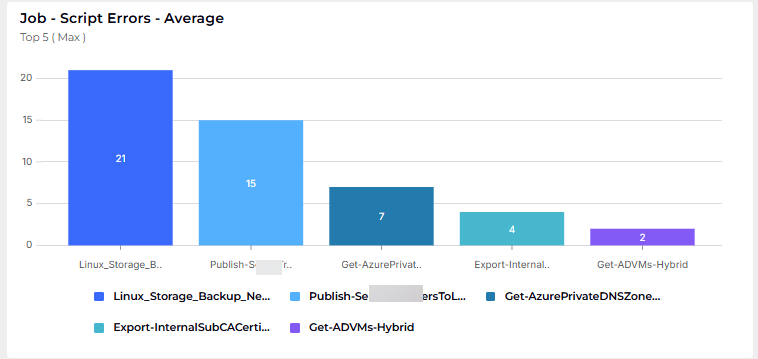
Purpose: Compute the average hourly Error stream occurrences in the past 24 hours for Automation Account runbooks tied to recently Completed/Failed jobs and return the five runbooks with the lowest averages.
Why Useful: Quantifies error frequency per runbook (correlated via CorrelationId) to quickly assess stability vs. noise without mixing in standard output logs.
Benefit: Helps prioritize remediation and monitoring by highlighting runbooks with consistently low error volumes (and, with descending sort, the most error-prone ones).
Runbooks without Schedule
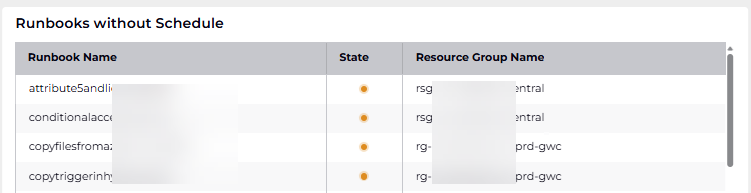
The file azurehybridworkerunlinkedRunbooks.csv is created by the functions Invoke-ResourceGraphQuery which uses Azure Resource Graph to query ALL runbooks across ALL subscriptions and Get-RunbookLinkedSchedules which gets all the Runbooks with linked schedules. A comparison reveals which are not scheduled.
function Invoke-ResourceGraphQuery {
    param (
        [Parameter(Mandatory = $true)]
        [hashtable]$Headers,

        [Parameter(Mandatory = $true)]
        [string[]]$Subscriptions
    )

    $query = @{
        query = 'resources | where type == "microsoft.automation/automationaccounts/runbooks" | project name, resourceGroup, subscriptionId, location'
        subscriptions = $Subscriptions
    }

    $resultList = New-Object -TypeName System.Collections.ArrayList

    try {
        $response = Invoke-RestMethod -Method Post `
            -Uri "https://management.azure.com/providers/Microsoft.ResourceGraph/resources?api-version=2022-10-01" `
            -Headers $Headers `
            -Body ($query | ConvertTo-Json -Depth 5)
        if ($response.data) {
            foreach ($item in $response.data) {

                if ($item.PSObject.Properties['name']) {
                    $item.name = $item.name.ToLower()
                }
                if ($item.PSObject.Properties['resourceGroup']) {
                    $item.resourceGroup = $item.resourceGroup.ToLower()
                }
                if ($item.PSObject.Properties['subscriptionId']) {
                    $item.subscriptionId = $item.subscriptionId.ToLower()
                }
                if ($item.PSObject.Properties['location']) {
                    $item.location = $item.location.ToLower()
                }
                $null = $resultList.Add($item)
            }
        }
        return $resultList
    } catch {
        Write-Error "Failed to execute Resource Graph query: $_"
        return $resultList
    }
} #end function Invoke-ResourceGraphQuery
function Get-RunbookLinkedSchedules {
[CmdletBinding()]
param (
[Parameter(Mandatory = $true)]
[string]$SubscriptionId,
[Parameter(Mandatory = $true)]
[string]$ResourceGroup,
[Parameter(Mandatory = $true)]
[string]$AutomationAccount,
[Parameter(Mandatory = $true)]
[hashtable]$Headers
)
$resultList = @()
$jobSchedulesUri = "https://management.azure.com/subscriptions/$SubscriptionId/resourceGroups/$ResourceGroup/providers/Microsoft.Automation/automationAccounts/$AutomationAccount/jobSchedules?api-version=2023-11-01"
try {
$jobSchedulesResponse = Invoke-RestMethod -Uri $jobSchedulesUri -Headers $Headers -Method Get
$jobSchedules = $jobSchedulesResponse.value
if ($jobSchedules -and $jobSchedules.Count -gt 0) {
foreach ($jobSchedule in $jobSchedules) {
$runbookName = $jobSchedule.properties.runbook.name
$scheduleName = $jobSchedule.properties.schedule.name
$resultList += [PSCustomObject]@{
AutomationAccount = $AutomationAccount.ToLower()
ResourceGroupName = $ResourceGroup.ToLower()
ScheduleName = $scheduleName.ToLower()
RunbookName = $runbookName.ToLower()
State = "success"
}
}
} else {
$resultList += [PSCustomObject]@{
AutomationAccount = $AutomationAccount.ToLower()
ResourceGroupName = $ResourceGroup.ToLower()
ScheduleName = "no schedule defined"
RunbookName = ""
State = "warning"
}
}
} catch {
$resultList += [PSCustomObject]@{
AutomationAccount = $AutomationAccount.ToLower()
ResourceGroupName = $ResourceGroup.ToLower()
ScheduleName = "error retrieving jobSchedules"
RunbookName = ""
State = "error"
}
Write-Warning "Failed to retrieve jobSchedules: $_"
}
return $resultList
} #end function Get-RunbookLinkedSchedulesPurpose: Identify all Automation Runbooks that currently have no schedule assigned.
Why Useful: It helps quickly detect orphaned or manually triggered runbooks that may be missing intended automation.
Benefit: Ensures operational consistency and reliability by highlighting runbooks that may require scheduling to function as part of automated workflows.
Job Duration – Last Run

let azRG = arg("").resources
| where type == "microsoft.automation/automationaccounts"
| extend Resource = toupper(name)
| project Resource;
let azDiag = AzureDiagnostics
| where TimeGenerated between (ago(8d) .. now())
| where ResourceType == "AUTOMATIONACCOUNTS"
| where ResultType != 'In Progress'
| where Category != 'AuditEvent'
| where ResultType != 'Created'
| sort by RunbookName_s
| summarize by CorrelationId, ResultType, Resource, TimeGenerated, RunbookName_s
| sort by TimeGenerated asc
| extend RunDurationRaw = TimeGenerated - prev(TimeGenerated)
| extend RunDurationInSec = RunDurationRaw / 1sec
| extend RunDuration = format_timespan(RunDurationRaw, 'hh:mm:ss')
| where ResultType == 'Completed' or ResultType == 'Failed';
azRG | join azDiag on $left.Resource == $right.Resource
| project TimeGenerated, RunbookName_s, RunDuration, RunDurationInSec
| summarize arg_max(RunDurationInSec,*) by RunbookName_s
| sort by RunDurationInSec desc
| limit 5
Purpose: Identify the top 5 runbooks with the longest observed runtime in the last 8 days across all Automation Accounts by computing run durations from diagnostics and selecting the max per runbook.
Why Useful: It spotlights runtime outliers so you can quickly focus on runbooks that may indicate performance issues, inefficiencies, or blocking behavior.
Benefit: Enables targeted optimization and reliability improvements by directing attention to the biggest runtime bottlenecks first.
🤖Automation Accounts🆔
Automation Account State
The file azureautomationaccountstate.csv is created by the PowerShell function Get-AutomationAccountStatistics . It contains usage statistics and throttle status for all Automation Accounts across all subscriptions, showing how close each account is to its resource limits.
function Get-AutomationAccountStatistics {
    param (
        [Parameter(Mandatory = $true)]
        [string]$subscriptionId,

        [Parameter(Mandatory = $true)]
        [hashtable]$headers
    )

    $uri = "https://management.azure.com/subscriptions/$subscriptionId/providers/Microsoft.Automation/automationAccounts?api-version=2023-11-01"
    $response = Invoke-RestMethod -Uri $uri -Method Get -Headers $headers

    $rsgGrpAutAcct = $response.value | Select-Object name, @{Name="ResourceGroupName";Expression={($_.id -split '/')[4]}}

    $autAcctLst = New-Object -TypeName System.Collections.ArrayList

    foreach ($itm in $rsgGrpAutAcct) {
        try {

            $uri = "https://management.azure.com/subscriptions/$subscriptionId/resourceGroups/$($itm.ResourceGroupName)/providers/Microsoft.Automation/automationAccounts/$($itm.name)/usages?api-version=2023-11-01"
            $response = Invoke-RestMethod -Uri $uri -Method Get -Headers $headers -ErrorVariable err

            if ($err) {
                Write-Host "Error: $err here!"
            }

            if ($response.value) {

                foreach ($resItm in $response.value) {

                    $useObj = [PSCustomObject]@{
                        subscriptionID  = $subscriptionId
                        rsgName         = $itm.ResourceGroupName
                        autacct         = $itm.name
                        theName         = $resItm.name | Select-Object -ExpandProperty value
                        unit            = $resItm.unit
                        limit           = [math]::Abs($resItm.limit)
                        throttleStatus  = $resItm.throttleStatus
                        currentValue    = $resItm.currentValue
                    }
                    $null = $autAcctLst.Add($useObj)
                }
            }
        } catch {
            Write-Host "An error occurred: $_ "
            write-host "Value for rsgGrpAutAcct is $($rsgGrpAutAcct)"

        }
    }

    return $autAcctLst

} # end Get-AutomationAccountStatistics
Purpose: Tracks resource consumption metrics (jobs, schedules, modules) and throttling status across all Azure Automation Accounts to identify accounts approaching or exceeding their service limits.
Why Useful: Azure Automation Accounts have hard limits on concurrent jobs, job schedules, and other resources that can cause job failures or throttling when exceeded, but these limits aren’t visible without explicit API queries.
Benefit: Enables proactive capacity planning and prevents production outages by alerting teams before accounts hit resource limits, allowing them to redistribute workloads, request quota increases, or create additional automation accounts before failures occur.
Concurrent Jobs
Is based on the file azureautomationaccountstate.csv which is created in the previously mentioned scripts. More details are available at: Automation Account State
Account Usage Time
Is based on the file azureautomationaccountstate.csv which is created in the previously mentioned scripts. More details are available at: Automation Account State
Source Control Integration
The file azurehybridworkerGITstate.csv is created by a PowerShell function named Get-AutomationAccountGITInformation.
function Get-AutomationAccountGITInformation {

    param (

        [Parameter(Mandatory = $true)]
        [hashtable]$headers,

        [Parameter(Mandatory = $true)]
        [string]$subscriptionId,

        [Parameter(Mandatory = $true)]
        [string]$rsgName,

        [Parameter(Mandatory = $true)]
        [string]$autAcc

    )

    $hyGITInfo = New-Object -TypeName System.Collections.ArrayList

    $uri = "https://management.azure.com/subscriptions/$subscriptionId/resourceGroups/$rsgName/providers/Microsoft.Automation/automationAccounts/$autAcc/sourceControls?api-version=2023-11-01"

    $response = Invoke-RestMethod -Uri $uri -Method Get -Headers $headers
    if ($response) {

        $hasError = $false

        if ($($response.value.name) -eq $null)  {
            $hasError = $true
        } else {
            $hasError = $false
        }

    }  else {
        $hasError = $true
    }

    if ($hasError) {
        $srvObj = [PSCustomObject]@{
            autAccName      = $autAcc
            rsgName         = $rsgName
            subscriptionId  = $subscriptionId
            Message         = "No Version control configured!"
            state           = "warning "
        }
    } else {
        $srvObj = [PSCustomObject]@{
            autAccName      = $autAcc
            rsgName         = $rsgName
            subscriptionId  = $subscriptionId
            Message         = $response.value.name
            state           = "success"
        }
    }

    $null = $hyGITInfo.Add($srvObj)

    return $hyGITInfo

} #end function Get-AutomationAccountGITInformation
Purpose Records whether each Azure Automation Account has Git/source control integration configured for runbook version management.
Why Useful Git integration is a best practice requirement for audit trails and change management, but Azure doesn’t provide a centralized view showing which accounts lack it.
Benefit Enables compliance auditing and identifies non-compliant Automation Accounts that lack version control, allowing teams to enforce governance standards and ensure all runbook changes are tracked and reversible.
📡Hybrid Worker Servers🗄️
Health State

The file azurehybridworkerstate.csv is created by a workflow three Powershell functions
- Get-HybridRunbookWorkerGroups – Inventories all worker groups across Automation Accounts
- Get-HybridRunbookWorkers – Extracts individual worker machine references from each group
- Get-HybridRunbookWorkerServers – Queries actual machine states (Azure VMs or Arc-enabled hybrid machines) to confirm they’re operational
function Get-HybridRunbookWorkerGroups {
    param (
        [Parameter(Mandatory = $true)]
        [string]$subscriptionId,

        [Parameter(Mandatory = $true)]
        [hashtable]$headers
    )

    $uri = "https://management.azure.com/subscriptions/$subscriptionId/providers/Microsoft.Automation/automationAccounts?api-version=2023-11-01"
    $response = Invoke-RestMethod -Uri $uri -Method Get -Headers $headers

    $rsgGrpAutAcct = $response.value | Select-Object name, @{Name="ResourceGroupName";Expression={($_.id -split '/')[4]}}

    $hybWrkGrpLst = New-Object -TypeName System.Collections.ArrayList

    foreach ($itm in $rsgGrpAutAcct) {
        try {
            $uri = "https://management.azure.com/subscriptions/$subscriptionId/resourceGroups/$($itm.ResourceGroupName)/providers/Microsoft.Automation/automationAccounts/$($itm.name)/hybridRunbookWorkerGroups?api-version=2023-11-01"
            $response = Invoke-RestMethod -Uri $uri -Method Get -Headers $headers -ErrorVariable err

            if ($err) {
                Write-Error "Error in function Get-HybridRunbookWorkerGroups: $err"
            }

            if ($response.value) {
                $null = $hybWrkGrpLst.Add($response.value)
            }
        } catch {
            Write-Error "Error function Get-HybridRunbookWorkerGroups: $_"
        }
    }

    return $hybWrkGrpLst
} #end function Get-HybridRunbookWorkerGroups
function Get-HybridRunbookWorkers {
param (
[Parameter(Mandatory = $true)]
[string]$subscriptionId,
[Parameter(Mandatory = $true)]
[hashtable]$headers,
[Parameter(Mandatory = $true)]
[System.Object]$hybWrkGrp
)
$hybWrkerLst = New-Object -TypeName System.Collections.ArrayList
$tmpItem = $hybWrkGrp -split '/'
$rsgName = $tmpItem[4]
$autAcc = $tmpItem[8]
$grpName = $tmpItem[10] -replace ' ',''
$grpName = $grpName.trim()
$uri = "https://management.azure.com/subscriptions/$subscriptionId/resourceGroups/$rsgName/providers/Microsoft.Automation/automationAccounts/$autAcc/hybridRunbookWorkerGroups/$grpName/hybridRunbookWorkers?api-version=2023-11-01"
$uri = $uri -replace '/hybridRunbookWorkerGroups//hybrid','/hybridRunbookWorkerGroups/hybrid'
$response = Invoke-RestMethod -Uri $uri -Method Get -Headers $headers
if ($response) {
foreach ($rec in $response.value) {
$null = $hybWrkerLst.Add($rec)
}
#$null = $hybWrkerLst.Add($response.value)
}
$regex = "resourceGroups/([^/]+)/"
$regexSub = '^\/[^\/]+\/([^\/]+)\/'
$hybWrkServList = New-Object -TypeName System.Collections.ArrayList
foreach($wrkSrv in $hybWrkerLst) {
$errMsg = $null
$hasError = $false
try {
$srvName = $wrkSrv.properties.workerName
if ($srvName -match '\.') {
$srvName = ($srvName -split '\.','')[0]
}
if ($wrkSrv.properties.vmResourceId -match $regex) {
$rsgName = $matches[1]
}
if ($wrkSrv.properties.vmResourceId -match $regexSub) {
$subId = $matches[1]
}
if ($wrkSrv.properties.workerType) {
$workerType = $wrkSrv.properties.workerType
}
} catch {
$hasError = $true
$errMsg = $_.Exception.Message
} finally {
if ($hasError) {
$srvObj = [PSCustomObject]@{
srvName = $srvName
rsgName = $rsgName
workerType = $workerType
subscriptionId = $subId
errorMsg = $errMsg
}
} else {
$srvObj = [PSCustomObject]@{
srvName = $srvName
rsgName = $rsgName
workerType = $workerType
subscriptionId = $subId
errorMsg = "No Error"
}
}
}
if ($srvObj) {
$null = $hybWrkServList.Add($srvObj)
}
}
return $hybWrkServList
} #end function Get-HybridRunbookWorkersfunction Get-HybridRunbookWorkerServers {
param (
[Parameter(Mandatory = $true)]
[string]$subscriptionId,
[Parameter(Mandatory = $true)]
[hashtable]$headers,
[Parameter(Mandatory = $true)]
[System.Object]$hybWrkServPair
)
$strPrintF = "Getting Hybrid Runbook Worker Server: $($hybWrkServPair.srvName) in Resource Group: $($hybWrkServPair.rsgName) for Subscription: $subscriptionId"
Write-Host $strPrintF
try {
$uri = "https://management.azure.com/subscriptions/$subscriptionId/resourceGroups/$($hybWrkServPair.rsgName)/providers/Microsoft.Compute/virtualMachines/$($hybWrkServPair.srvName)/instanceView?api-version=2024-07-01"
$response = Invoke-RestMethod -Uri $uri -Method Get -Headers $headers -ErrorVariable respErr
$powerState = $response.statuses | Where-Object { $_.code -like 'PowerState/*' } | Select-Object -ExpandProperty code
$powerState = $powerState -replace 'PowerState/',''
$state = $null
if ($powerState -eq 'running') {
$state = 'Success'
} else {
$state = 'Error'
}
$srvObj = [PSCustomObject]@{
srvName = $($response.computerName).toupper()
provisioned = $($response.statuses[0].code -replace 'ProvisioningState/','').toLower()
state = $state
lastStatusChanged = $((Get-Date).ToUniversalTime().ToString("yyyy-MM-ddTHH:mm:ss.fffffffZ"))
type = "Azure"
rsgGroup = $($hybWrkServPair.rsgName)
}
if (-not $respErr) {
$uriShrt = "https://management.azure.com/subscriptions/$subscriptionId/resourceGroups/$($hybWrkServPair.rsgName)/providers/Microsoft.Compute/virtualMachines/$($hybWrkServPair.srvName)?api-version=2024-07-01"
$responseShrt = Invoke-RestMethod -Uri $uriShrt -Method Get -Headers $headers -ErrorVariable respErr
$srvObj | Add-Member -MemberType NoteProperty -Name "location" -Value $responseShrt.location
}
} catch {
try {
$Error.Clear()
$uri = "https://management.azure.com/subscriptions/$subscriptionId/resourceGroups/$($hybWrkServPair.rsgName)/providers/Microsoft.HybridCompute/machines/$($hybWrkServPair.srvName)?api-version=2024-07-10"
$response = Invoke-RestMethod -Uri $uri -Method Get -Headers $headers
$state = $null
$status = $response.properties.status
if ($status -eq 'Connected') {
$state = 'Success'
} else {
$state = 'Error'
}
$srvObj = [PSCustomObject]@{
srvName = $($response.name).toupper()
location = $response.location
provisioned = $($response.properties.provisioningState).tolower()
lastStatusChanged = $response.properties.lastStatusChange
state = $state
type = "Hybrid"
rsgGroup = $($hybWrkServPair.rsgName)
}
} catch {
$srvObj = [PSCustomObject]@{
srvName = $($hybWrkServPair.srvName)
location = "NotFound"
status = "NotFound"
provisioned = "NotFound"
state = "Error"
lastStatusChanged = "NotFound"
rsgGroup = "NotFound"
}
}
}
return $srvObj
} #end function Get-HybridRunbookWorkerServersPurpose: Captures the real-time operational state of every Hybrid Runbook Worker machine (both Azure VMs and Arc-enabled on-premises servers) across all subscriptions, documenting whether workers are online, properly provisioned, and ready to execute automation runbooks.
Why Useful: Runbook jobs can fail silently when scheduled to offline or disconnected hybrid workers, and Azure doesn’t provide a unified dashboard showing the health of all worker machines across multiple subscriptions and automation accounts.
Benefit: Prevents job execution failures by proactively identifying offline, failed, or disconnected worker machines before runbooks are scheduled to them, enables faster troubleshooting of automation failures, and provides compliance reporting showing the operational status of distributed automation infrastructure across hybrid cloud environments.
Conclusion
Building meaningful observability for Azure Automation isn’t about flashy dashboards — it’s about turning raw telemetry into clarity, confidence, and control. The queries and scripts in this post give you everything you need to surface real operational insight: from runbook reliability to governance signals, from hybrid worker health to capacity trends. By adopting these patterns, you can accelerate troubleshooting, strengthen governance, and ensure your Automation Accounts stay predictable and resilient.
Whether you use the snippets as‑is or adapt them to your own environment, this dashboard approach provides a practical foundation for operational excellence in Azure Automation. If you have questions, want to extend the solution, or need help tailoring it to your organization, feel free to reach out — I’m always happy to support the journey toward better observability.
